ADS

ADS

Pages

News

Sponors

Location

Showing posts with label technology. Show all posts

Tuesday, 10 February 2015

Will Robots Take Our Jobs


 Cheaper, better robots will replace human workers in the world's factories at a faster pace over the next decade, pushing manufacturing labour costs down 16 percent, a report Tuesday said.

The Boston Consulting Group predicts that investment in industrial robots will grow 10 percent a year in the world's 25-biggest export nations through 2025, up from 2 percent to 3 percent a year now. The investment will pay off in lower costs and increased efficiency.
Robots will cut labour costs by 33 percent in South Korea, 25 percent in Japan, 24 percent in Canada and 22 percent in the United States and Taiwan. Only 10 percent of jobs that can be automated have already been taken by robots. By 2025, the machines will have more than 23 percent, Boston Consulting forecasts.

Robots are getting cheaper. The cost of owning and operating a robotic spot welder, for instance, has tumbled from $182,000 in 2005 to $133,000 last year, and will drop to $103,000 by 2025, Boston Consulting says.

And the new machines can do more things. Old robots could only operate in predictable environments. The newer ones use improved sensors to react to the unexpected.
In a separate report, RBC Global Asset Management notes that robots can be reprogrammed far faster and more efficiently than humans can be retrained when products are updated or replaced — a crucial advantage at a time when smartphones and other products quickly fade into obsolescence.

"As labour costs rise around the world, it is becoming increasingly critical that manufacturers rapidly take steps to improve their output per worker to stay competitive," said Harold Sirkin, a senior partner at Boston Consulting and co-author of the report. "Companies are finding that advances in robotics and other manufacturing technologies offer some of the best opportunities to sharply improve productivity."
Boston Consulting studied 21 industries in 25 countries last year, interviewing experts and clients and consulting government and industry reports.

The rise of robots won't be limited to developed countries with their aging, high-cost workforces. Even low-wage China will use robots to slash labour costs by 18 percent, Boston consulting predicts.
Increasing automation is likely to change the way companies evaluate where to open and expand factories. Boston Consulting expects that manufacturers will "no longer simply chase cheap labour." Factories will employ fewer people, and those that remain are more likely to be highly skilled. That could lure more manufacturers back to the United States from lower-wage emerging market countries.

Read More »

Thursday, 15 January 2015

YouTube The New Motown Records

The biggest name in the entertainment business is YouTube, what determine your music career is not the recording company you are with or how talented you are. What determine your music career is the amount of views you get on YouTube.

YouTube is a video social network site, YouTube is an easy way for users to share there videos with millions of users. YouTube is the most popular video social media network site, in the 60's , 70's, 80's and 90's you would have to find a recording company like Motown who was very popular at the time  to invest in your career. Now the easiest way to get recognize is thru social media network sites like YouTube or Facebook.

Social media networks sites like YouTube and Facebook have millions of daily users which makes it quite easy to put across you products or services to millions of potential customers. There are quite a few celebrities that got very rich and famous from YouTube like Dondria, Soulja Boy, Marié Digby and Justin Bieber the most popular of them all.


A very inspirational case was a so call mad man who lived in a gully in Jamaica who goes by the name Gully Bop. He was discovered by a teenager who upload a video of him singing on Facebook he soon became a social media celebrity, since then he has made many great appearance on some of the biggest reggae shows and he has made a good impression so far. Is latest single "Drop me" got 120,000 views in the first 3 days on YouTube.


Read More »

Thursday, 27 November 2014

Quickbook Point Of Sales Review

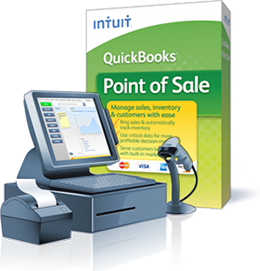
Quickbooks Point Of Sales is the most and easily used point of sales world wide for small , large and medium size business. Any retail or wholesale business can use quickbooks Point Of Sales, it is full time now you throw away your old cash register machine.


With Quickbooks Point Of Sales you can track your inventory and sales instantly, when you buy goods it increase your inventory and when you sell goods it decrease your inventory. You can get your daily sales reports by a click of a button.


With Quickbooks Point of Sales you can buy in case and sell in single with the unit of measure feature when setting up your inventory you can add tax to items if you desire. You can set different price levels to meet your customers demand.


You can easily set your discount price level for any goods you may desire, Quickbooks Point Of Sales is design to use with any barcode scanner or pos printers. You simply scan the item with the barcode scanner the item it pops up you then print with the point of sales printer as easy as 123.


Need any help with Quickbooks Point Of Sales in Jamaica. call 1-876-791-7676

Read More »

Tuesday, 23 September 2014

Why Would Apple Shut Down Beat

Why would Apple shut down Beat, it is the  same question i asked when Microsoft discontinue words perfect the greatest words processor software of all time. Apple bought beat for 3 billion dollars and now plan to shut it down but why, the answer is simple monopoly.

If there is a product that is competing against yours, one way to win the battle is to get rid of your competitor completely. There are many ways to do this, you can compete with quality that's going to cost you a fortune, or you can run a expensive advertisement campaign which most times don't work.

The best way to do this is to buy out your competitor, give them a offer they cant refuse then you simple merge both products together or just simple dump one. We have seen this over and over again.

Apple has finally learn from Microsoft the old business trick, what Microsoft did was they did not improve on there product or in some case use the best of the two. What they did was throw away the product that they bought and used there owe which in most case the Microsoft product was the worst. Take for instance word perfect and lotus 123, Microsoft dump those two great product and promote Microsoft Office.

As consumers what we would like to see is Apple merging Itunes and Beat and give us as consumer a great product.
Read More »

Wednesday, 17 September 2014

Making Money Writing Programs

With the high inflation eating away my savings, i have been exploring ways to make money both online and offline. One way i found to do this is by writing applications mostly database applications.

Writing programs takes a lot of time and effort but with the right marketing skills it can worth your time, before you write a program you have to do your field study. You have to know what you are writing the program about, you have to know what the client wants so you can tailor the application to suits the customers needs.


Take for instance you are writing a program for a small motel, you have to learn about there present reservation system so that you customize your program to suit there  needs. Reporting is very important most companies use reports in order to make very important decision. You have to find out from your client the type of report he or she needs.

The next step is to do your coding there are quite a few applications you can use to write your programs what i use is Visual Studios. It takes sometime to learn but as soon as you get a drift of it you are good to go.

Marketing is a very important word in the world of business if you have the best product and nobody knows about it, it makes no sense there are lot of ways you can market your programs there are a lot of sites online that sells your software, you can also use social media like Facebook , twitter , Google Plus and YouTube Etc.

Hear is a Simple Example


Public Class HelloForm
Private Sub btnDisplayHello_Click(
ByVal sender As System.Object,
ByVal e As System.EventArgs
) Handles btnDisplayHello.Click
lblHelloWorld.Text = “Hello World”
End Sub
End Class

This example Prints Hello World.

Read More »

Monday, 28 April 2014

Knight Rider Is Now A Reality : Google Driverless Cars Are Hear To Stay


LOS ANGELES (AP) – Google says it has turned a corner in its pursuit of a car that can drive itself.
The tech giant's self-driving cars already can navigate freeways comfortably, albeit with a driver ready to take control. But city driving -- with its obstacle course of jaywalkers, bicyclists and blind corners -- has been a far greater challenge for the cars' computers.
In a blog entry posted Monday, the project's leader said test cars now can handle thousands of urban situations that would have stumped them a year or two ago.

"We're growing more optimistic that we're heading toward an achievable goal -- a vehicle that operates fully without human intervention," project director Chris Urmson wrote.
Urmson's post was the company's first official update since 2012 on progress toward a driverless car, a project within the company's secretive Google X lab.
The company has said its goal is to get the technology to the public by 2017. In initial iterations, human drivers would be expected to take control if the computer fails. The promise is that, eventually, there would be no need for a driver. Passengers could read, daydream, even sleep -- or work -- while the car drives.
Google maintains that computers will one day drive far more safely than humans, and part of the company's pitch is that robot cars can substantially reduce traffic fatalities.
The basics already are in place. The task for Google -- and traditional carmakers, which also are testing driverless cars -- is perfecting technology strapped onto its fleet of about two dozen Lexus RX450H SUVs.
Sensors including radar and lasers create 3D maps of a self-driving car's surroundings in real time, while Google's software sorts objects into four categories: moving vehicles, pedestrians, cyclists and static things such as signs, curbs and parked cars.
Initially, those plots were fairly crude. A gaggle of pedestrians on a street corner registered as a single person. Now, the technology can distinguish individuals, according to Google spokeswoman Courtney Hohne, as well as solve other riddles such as construction zones and the likely movements of people riding bicycles.
To deal with cyclists, engineers initially programmed the software to look for hand gestures that indicate an upcoming turn. Then they realized that most cyclists don't use standard gestures - and still others weave down a road the wrong way.

So engineers have taught the software to predict the behavior of cyclists based on thousands of encounters during the approximately 10,000 miles the cars have driven autonomously on city streets, Hohne said. The software projects a cyclist's likely movements and plots the car's path accordingly - then reacts if something unexpected happens.

"A mile of city driving is much more complex than a mile of freeway driving, with hundreds of different objects moving according to different rules of the road in a small area," Urmson wrote.
Before recent breakthroughs, Google had contemplated mapping all the world's stop signs. Now the technology can read stop signs, including those held in the hands of school crossing guards, Hohne said.
While the car knows to stop; just when to start again is still a challenge, partly because the cars are programmed to drive defensively. At a four-way stop, Google's cars have been known to wait in place as people driving in other directions edge out into the intersection -- or roll through.
The cars still need work on other predictably common tasks. Among them, understanding the gestures that drivers give one another to signal it's OK to merge or change lanes, turning right on red and driving in rain or fog (which requires more sophisticated sensors).


And when will these and other problems be solved?
"You can count on one hand the number of years until people, ordinary people, can experience this," company co-founder Sergey Brin said in September 2012. He made the remarks at a ceremony where California Governor Jerry Brown signed legislation legalizing the cars on public roads in the state.
To date, Google's cars have gone about 700,000 miles in self-driving mode, the vast majority on freeways, the company said.

California's Department of Motor Vehicles is in the process of writing regulations to implement that law. Nevada, Florida, Michigan and Washington, DC, also have written driverless car laws.
Google has not said how it plans to market the technology. Options include collaborating with major carmakers or giving away the software, as the company did with its Android operating system. While Google has the balance sheet to invest in making cars, that likelihood is remote.
Traditional automakers also are developing driverless cars. Renault-Nissan CEO Carlos Ghosn said he hopes to deliver a model to the public by 2020.

Read More »

Monday, 18 November 2013

How To Use Whatsapp On Your Computer (PC)

WhatsApp Messenger is a cross-platform instant messaging  service for Blackberry ,Iphone, Nokia and Galaxy  smartphones. Users can send each other text, images, video, and audio media messages.

To use WhatsApp on your computer you will need a android emulator, the most popular one is bluestacks.


Now follow the step by step guide to install Whatsapp on your pc using bluestacks.


  • Download Bluestacks
  • Then install it into your computer system
  • After that open Bluestacks and go to “My Apps”
  • After that search for “WhatsApp”
  • Download and install it
If there is a problem using Bluestacks you can try Youwave for Android, it is a paid software but it is easier to install that bluestacks.

So i would use youwave as an alternative for bluestacks.


Read More »

Wednesday, 25 September 2013

What Is Hacking What is a Hacker

Hacking is any effort used to manipulate the behavior of any network connections or connected systems. A Hacker is any one who is engaged in hacking. The term hacking is referred to constructive, clever technical work that was not necessarily related to any computer systems.


How to prevent from been hacked, to be honest antivirus does not prevent your system from been hacked, antivirus software only gives you a false sense of security. One way i prevent from been hacked is to change my password at least once a week this will give the hacker a lot more work to do.


Don't use internet cafe to access your social network accounts or to access your email address accounts, this is one of the easiest way that hackers use to capture your data. Try to avoid using free WiFi networks, we all love free things but try and remember that there is nothing in life that is free, hackers love the idea to use free WIFI system to capture your data. 


Avoid free software online, yes the word free comes up again hackers used free software to capture your data, when you install a free software you also install spyware, what the spyware does it send all your information to the hackers.


What a hacker can do with your information, Wow that's a good question. Your personal information is your life, a hacker having all your information is like a total stranger finding your diary with all your personal information like your date of birth your social security numbers, credit card numbers and all your contacts.


Now ask your self the main question would you like someone to have all that information at there disposal.


Read More »

Sunday, 7 July 2013

Gadgets To Have In A Hurricane or Storm

Each year we have noticed that there is more and more storms heading our way, it is now a part of life to have major hurricanes and storms yearly. It is predicted that there will be much more storms this year than last year.

One of the main thing to have in a storm is a good flash light with some very good batteries it is not wise to light candles during a storm as this can cause fire which can lead to serious injuries or death.


It is very important to have a cellphone that is properly charged  during a storm. Please don't make unnecessary calls as this will run down your batteries and your phone credit. Only use your phone to make emergency calls, please keep your cellphone in a dry place keep it away from water. I always recommend a cellphone that has on a flashlight and a radio for the storm.


In most instances after a storm there is no power the lines are down, that's why I always have an inverter on hand. An inverter can be use to charge your laptops and your cellphones, you can connect your inverter to your car batteries or your battery bank. What the inverter does is convert dc power to ac power so you can run your ac appliances as mentioned above.
 
What would we do without a good radio in a storm ? It is very important to have a radio in the storm so we can stay in tune to the weather channels and get regular updates about the storm. Make sure that the radio has proper batteries and try your best not to get your radio wet.


Please stay indoors and keep dry. If you are asked to evacuate by the local authorities please do so.  
Read More »

Sunday, 16 June 2013

Google launch Internet beaming balloons

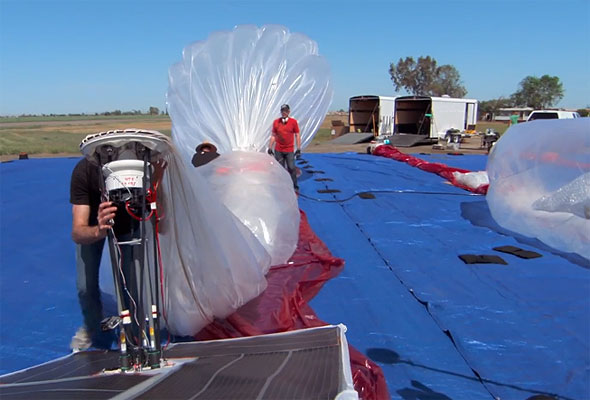
Google is launching Internet-beaming antennas into the stratosphere aboard giant, jellyfish-shaped balloons with the lofty goal of getting the entire planet online.
Eighteen months in the works, the top-secret project was announced Saturday in New Zealand, where up to 50 volunteer households are already beginning to receive the Internet briefly on their home computers via translucent helium balloons that sail by on the wind 12 miles above Earth.

While the project is still in the very early testing stages, Google hopes eventually to launch thousands of the thin, polyethylene-film inflatables and bring the Internet to some of the more remote parts of the globe, narrowing the digital divide between the 2.2 billion people who are online and the 4.8 billion who aren't.
If successful, the technology might allow countries to leapfrog the expense of installing fibre-optic cable, dramatically increasing Internet usage in places such as Africa and Southeast Asia.
"It's a huge moonshot, a really big goal to go after," said project leader Mike Cassidy. "The power of the Internet is probably one of the most transformative technologies of our time."
The so-called Project Loon was developed in the clandestine Google X lab that also came up with a driverless car and Google's Web-surfing eyeglasses.
Google would not say how much it is investing in the project or how much customers will be charged when it is up and running.
The first person to get Google Balloon Internet access this week was Charles Nimmo, a farmer and entrepreneur in the small town of Leeston who signed up for the experiment. Technicians attached a bright red, basketball-size receiver resembling a giant Google map pin to the outside of his home.
In a successful preliminary test, Nimmo received the Internet for about 15 minutes before the 49-foot-wide transmitting balloon he was relying on floated out of range. The first thing he did was check the weather forecast because he wanted to find out if it was a good time for "crutching" his sheep, or removing the wool around their rear ends.
Nimmo is among the many rural folk, even in developed countries, who can't get broadband access. After ditching his dial-up four years ago in favour of satellite Internet service, he has gotten stuck with bills that sometimes exceed $1,000 a month.
"It's been weird," Nimmo said of the Google Balloon Internet experience. "But it's been exciting to be part of something new."
In recent years, military and aeronautical researchers have used tethered balloons to beam Internet signals back to bases on Earth. Google's balloons would be un-tethered and out of sight, strung out in a line around the globe. They would ride the winds around the world while Google ground controllers adjusted their altitude to keep them moving along the desired route.
Ground stations about 60 miles apart would bounce Internet signals up to the balloons. The signals would hop backward from one balloon to the next to keep people continuously connected. Solar panels attached to the inflatables would generate electricity to power the Internet circuit boards, radios and antennas, as well as the onboard flight-control equipment.
Each balloon would provide Internet service for an area twice the size of New York City, or about 780 square miles, and because of their high altitude, rugged terrain is not a problem. The balloons could even beam the Internet into Afghanistan's steep and winding Khyber Pass.
"Whole segments of the population would reap enormous benefits, from social inclusion to educational and economic opportunities," said DePauw University media studies professor Kevin Howley.
Once in place, the light but durable balloons wouldn't interfere with aviation because they fly twice as high as airplanes and well below satellites, said Richard DeVaul, an MIT-trained scientist who founded Project Loon and helped develop Google Glass, eyeglasses with a tiny, voice controlled computer display.
In the US, however, Google would have to notify the Federal Aviation Administration when the balloons are on their way up or down. The company is talking with regulators in other countries about meeting their requirements.
The Internet signals travel in the unlicensed spectrum, which means Google doesn't have to go through the onerous regulatory processes required for Internet providers using wireless communications networks or satellites.
At this stage, the company is putting a few dozen balloons up over New Zealand and then bringing them down after a short period. Later this year, Google hopes to have as many as 300 of them circling the globe continuously along the 40th parallel, on a path that takes them over New Zealand, Australia, Chile and Argentina.
Covering the whole world would require thousands of the balloons. No timetable has been set for that.

Read More »

Thursday, 13 June 2013

About TeamViewer

TeamViewer is a remote software that can be use to access your PC from anywhere its is mainly intended to assist users control, view or transfer files from remote PCs or servers. TeamViewer as many  features for the remote access user. In addition to file transfer and remote access capabilities, there are also other features that make this software the ideal companies.


Learn How To Install And Use TeamViewer Below


Install the Software on the Second Computer
  1. Click Hear To Download TeamViewer  Once the download is complete, launch the app's installer.
  2. Select Install and then Next.                                                                                 Install-or-Run
  3. For personal use, please select personal/noncommercial and then click Next.
  4. Accept the license and usage agreement by selecting both checkboxes and clickingNext.
  5. For installation type, select Yes to install the host listening software on the current computer; then click Next. The software will now be installed.
  6. The app will prompt you to set up unattended access. Click Next, set a descriptive name and password for the computer, and click Next again.
  7. Select I already have a TeamViewer account. Fill in the username and password that you created previously, and then click Next. Click Finish to complete the setup.
The second computer will now be running listening software that waits for approved devices to connect to it, and can also connect to other computers you configure.
With the software is installed at both ends, connecting to the remote computer (typically called the host) from the computer/device where you are currently located (typically called the guest) should be easy.

Remote-Control-Interface
Remotely Connect to One Computer From the Other
  1. Launch the software on the guest.
  2. Enter your TeamViewer account login credentials, and log in.                                   Enter-Password
  3. A list of computers associated with your account will be appear in the My Partners list; one of them will be the host computer that you configured earlier. Double-click the name of the remote computer that you want to connect to.
  4. Your remote computer's display will appear in a window, just as if you were sitting directly in front of it. Use the keyboard/mouse/touchpad/touchscreen of your current device to interact with it as you normally would. The software will take your local input and send it to your remote computer, which will then send its display back to your current device in real-time. (Note: For security reasons, some keys and key combinations won't go directly to your remote host, like Ctrl-Alt-Del for Windows. TeamViewer enables you to send these special keys and combinations through its software Actions menu.)
  5. When you're done accessing your remote computer, close the window to end the session.
Read More »

Thursday, 23 May 2013

What Is A Drone

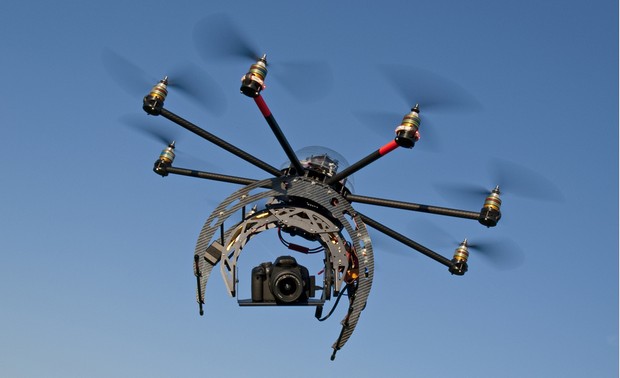
A drone is a unmanned aerial vehicle they are controlled by pilots on the ground. Drones are mostly used in areas where manned flight is considered too risky or difficult. They can provide  24 hours around the clock surveillance.


They can can stay in the sky for as long as 17 hours, They are mostly used by the United States Air Force and Royal Air Force for  intelligence surveillance.The use of these unmanned aircraft began under President George W Bush, but they have now doubled there use under the Obama administration.


The drones carry a wealth of sensors in their bulbous noses: colour and black-and-white TV cameras, image intensifiers, radar, infra-red imaging for low-light conditions and lasers for targeting. They can also be armed with laser-guided missiles. Two of the most popular type of drones are the MQ-1B Predator and the MQ-9 Reaper


.
Read More »

Monday, 15 April 2013

What is a Smart Watch (Smartwatch)

A smartwatch  is a computerized wristband, it has features beyond time keeping. Some smart watch can run mobile apps, play music, play videos and play Fm Radio.


These watches comes with camera, gps tracking capabilities, wifi capabilities ,cell phone, touch screen and much more.


Some of the popular brands of smart watch are:


Sony SmartWatch

OS: Android
Screen: 1.3 OLED, 128 x 128
Storage: None
Connectivity: Bluetooth 3.0
Weight: 15.5 g main unit, 26 g watchband
Battery: Undisclosed, lasts a few days with normal usage


Motorola MotoACTV


Size: 46 x 46 x 9.6 mm
Weight: 35g
Display: 1.6-inch Trasflective TFT, QCIF+ 176x220 (optimized for Indoor/Outdoor)
Supported Audio Formats: AAC, AAC+, MP3
System Memory: 256MB
Storage: 8GB capacity (16GB also available)
Connectivity: 3.5mm Headset, USB 2.0 HS
Bluetooth: Stereo Bluetooth Class 1.5
Sensors: ANT+, BLE, Accelerometer
WLAN: 802.11 b/g/n
Location: GPS+
Battery: 258 mAh
Standby Time: 325 hours
Playback Time: 20 hours
Workout Time: 10 hours indoor, 5 hours outdoor


WIMM One Watch

Product dimensions: 1.3 x 0.5 x 1.4 inches
Wifi
Bluetooth
USB Connection
Audible and Tacticle alerts
Accelerometer
Magnetometer
Bi-Modal Display
Capacitive Touch Screen
Up to 32GB memory
Splash Resistant
22G
Charges via USB or paddle


MetaWatch


Handset compatibility: iPhone 4s, iPad (3), Android (various)
Sensor compatibility: Initially, Wahoo Fitness BLE sensors for iPhone 4s
iOS compatibility: iOS 5 (basic functionality), iOS 6 (enhanced functionality)
Double injection molded PU, co-molded with PC body 
Mineral hardened glass lens with anti-glare coating 
Titanium finished stainless steel top ring 
5 ATM water resistant (you can swim with it, but no diving) 
96x96 mirror polymer network display 
Vibrating alerts 
6 buttons
Rechargeable (5-7 day battery life)
Dual Mode Bluetooth 4.0**
3 Axis accelerometer / ambient light sensor


Read More »

Wednesday, 27 March 2013

Google Glass Features, Specs And Reviews

Google Glass is a web-connected wearable handset that can record videos and captures pictures just like a smart phone.

It has a Built-in microphones let wearers command the internet-linked glasses by speaking.

It as the capable of displaying current weather conditions on the glass screen. Beyond this, it is even capable of predicting weather forecast like probability of rain.

There is also a app that shows the date and helps a user to create notes.
You can make and receive calls with video chat.

There is a clock app that inform you about the time.

It comes with a Broadcom 2.4GHz 802.11 b/g WiFi radio and a Bluetooth 4.0 low-energy module

It is rumoured that the Google Glass will have 3g and 4g internet capabilities. 


Read More »

Wednesday, 7 November 2012

IPTV Review Internet Protocol Television


There are now many ways in which television material can be delivered these days. One method that is set to make a huge impact is IPTV. As the name indicates, IPTV, or Internet Protocol Television, is based around the use of Internet Protocol, and this means that the service tends to be used in conjunction with telecommunications services of which broadband internet lines are the most widely used, although any service that can carry packet data can be used.
IPTV has many advantages. It provides a potentially lucrative market in view many telecommunications providers are looking keenly at the possibilities of providing new services and generating new revenue streams. This means that in the years to come IPTV seems certain to become a major player in the entertainment market.

IPTV Basics

There are two basic ways in which the material for IPTV can be handled. It can be sent out as broadcast or "multicast" material to many users simultaneously or it can be used to provide video-on-demand where the material is sent to just one subscriber who has requested that particular item.
It is also necessary to ensure that bandwidth is used efficiently. To achieve this, the IPTV video is compressed and two main formats are used for this. One is MPEG-2, and the other is the newer MPEG-4 standard. Of these the MPEG-4 standard is being used increasingly in view of its superior performance.

Basic IPTV system

For the user, an IPTV system is based around a set top box or an equivalent such as a computer. This receives the incoming data and re-assembles the data packets and decodes them to provide the required output for passing on to a television or other form of screen for viewing.
The system at the service provider end is considerably more complicated and requires a number of elements to ensure that the system operates correctly under both unicast and multicast conditions.
The core for any IPTV system is the operator's central distribution centre. Here the material is assembled and encoded.
Once encoded, the video stream is split into packets, so that it can enter the IP network system and routed to the relevant destination or destinations. The video streams consisting of these packets then travel from the centre of the network to outlying local exchanges and routing centres before being routed on to the individual subscribers. It is typically at these local centres that where authentication, channel change requests, billing and video-on-demand requests are handled.

Channel selection

One important aspect of multicasting is the ability of the system to be able to select the required channel and change it as required. In order that vast amounts of data are not set to the set top box, or any other form of IP receiver, one a single channel is sent to a given receiver.
Channel selection is accomplished by using a special protocol known as IP Group Membership Protocol (IPGMP). This is a communications protocol used to manage the membership of Internet Protocol multicast groups. It is used by IP hosts and adjacent multicast routers to establish multicast group memberships.
When a local routing centre receives a request to receive multicast data or to change from one channel to another, it checks to ensure that the user is authorised to connect to the channel and then it directs its routers to add the particular user to its distribution list. In this way only the channels that are being used are routed to the receiver, and this saves enormous amounts of data.

Unicast / video on demand

In order that users can connect to a video on demand service a different set-up is needed. The local server operates in a fashion that enables single streams of data to be drawn off as required and it is controlled using a different protocol to that used for multicasting is used. Known as Real Time Streaming Protocol, RTSP, it controls the data stream and allows DVD-style control over the media stream, enabling the user to play, pause and stop the programme being watched.

Quality of Service (QoS)

One of the major elements of any IP network is the control of the Quality of Service. To enable the video stream to be maintained and to prevent delays and fragmentation of the packets on the network, it is necessary to ensure that the Quality of Service is maintained. The Quality of Service tags assign the required priority to different packets on the network, and in this way enable time sensitive packets such as live video or voice traffic to have a higher priority than those such as Internet browsing where delays can be tolerated. By using QoS tags and tools, the required data streams can be transmitted to make maximum use of the available bandwidth, while still maintaining the required level of performance.
Read More »

Sunday, 4 November 2012

How to set up a simple solar system


We all know that outfitting a house with solar panels is not cheap right now. Harnessing enough sun to be able to live completely off-grid costs many thousands of dollars, up to many tens of thousands depending on how much electricity is needed. But do we really need to go from 0% to 100% clean energy in one go? That's not usually the way things are done; we usually do incremental changes. The idealist will say that it's not fast enough (and might be right), but the realist will say that the mainstream has more chances of going for it if it's not too radical and expensive, and that the power of numbers is hard to deny. So the question is: Do we really need to go 100% solar at once? What is the least you could pay and still end up with enough solar juice to run some things around the house? 
run a 20-inch tv for 20 hours, a portable stereo for 100 hours, a laptop computer for 40 hours, or a 12-watt compact-fluorescent light bulb for 80 hours.


The 800-watt inverter (with a 2,000-watt surge capacity) will run a small vacuum cleaner, a drill or a small drill press, a sander, a jigsaw or small band saw, but not a large circular saw. It will handle many toasters and coffee makers, but not all. A blender would be child's play for this inverter, a microwave an impossibility. A hair dryer on low, yes; on high, forget it.


Here's what the "$600 kit" consists of:
One Uni-Solar 32-watt amorphous-silicon PV module, 12 volts: $180.00
One Morningstar 6-amp charge controller, 12 volts: $40.00
Two Deka 92 amp-hour sealed batteries, 12 volts: ($130.00 each) $260.00
One Aims 800-watt modified sine wave inverter, 12 volts: $65.00
TOTAL: $545.00
This leaves you with $55 for wire, battery cables, mounting hardware, fuses between components, and the miscellaneous odds and ends that are always needed for any project of moderate complexity.
Most of these can probably be found online at some of the alternative energy stores we've covered in the past.
But the beauty is that once you've go the "starter" solar system, it is relatively easy to expand it as your needs or wallet grow.
With the exception of the inverter, this system can be easily expanded. Any number of similar modules can be wired together in parallel, so long as the modules are of the same wattage. The 6-amp charge controller can manage up to three 32-watt modules, and extra charge controllers can be wired into the system, in parallel, as your lust for power begins to swell.
Batteries, of course, are always happy to see their numbers multiply.
But alas, the inverter is what it is. It cannot be connected to another inverter to provide more power (though more expensive models can be), nor can it be configured to operate at a higher input voltage, should you ever get ambitious and change the system voltage to 24 or 48 volts. On the other hand, at $65, does it really matter? A slightly-used 800-watt AC power source that can draw power right off the battery is a handy accessory any vehicle would be proud to have tucked away next to the spare tire.
So, while you're saving up to buy the deluxe 4000-watt pure sine-wave inverter with battery charging capabilities, enjoy the little $600 starter system that got your foot in the solar-energy door, and try to imagine where it all might lead.
This project is Do-It-Yourself only if you know what you are doing, and as usual when electricity is involved, a qualified electrician should approve your setup before you power it on.
Read More »